

Why Product Descriptions Are Undervalued in Google Shopping
The product description is the second most important text attribute in your Google Shopping feed — right after the title. Yet most merchants neglect it or simply copy their store descriptions into the feed without optimizing for the feed format.
This is a costly mistake. Google actively uses the description for query matching: when a customer searches for "waterproof men's hiking boots Gore-Tex," a well-written description can match your product to the right query even if your title doesn't contain all those keywords. According to Google Merchant Center Help, the description attribute directly feeds into relevance scoring and influences which search queries trigger your product.
Products with optimized descriptions show up to 25% higher impression share compared to products with generic or missing descriptions, according to a DataFeedWatch analysis. In Performance Max campaigns, where Google's AI automatically creates ads from your feed data, a precise description delivers better signals for automated ad generation — better signals mean better ads, and better ads mean more conversions.
Titles vs. Descriptions: How Google Uses Both Attributes
Titles and descriptions complement each other — they don't compete. The title primarily determines which search queries trigger your product. The description provides additional context that refines the relevance score and gives Google's AI more material for matching.
The key differences:
| Aspect | Title (title) | Description (description) |
|---|---|---|
| Maximum length | 150 characters | 5,000 characters |
| Visible in Shopping Ads | Yes (~70 characters) | No (only on Shopping tab) |
| Query matching influence | Very high | High |
| CTR influence | Direct (visible) | Indirect (via better matching) |
| Keyword density | High (compressed) | Natural (more room for long-tail) |
The title is your storefront. The description is your sales rep working behind the scenes. We've already covered how to optimize your product titles in detail. This guide focuses on the second piece of the puzzle: the description.
Google Shopping Description Requirements: The Complete Overview
Google allows up to 5,000 characters for the product description — significantly more than the 150 characters for titles. Use this space strategically, not as filler.
Google's Official Guidelines
| Parameter | Value |
|---|---|
| Maximum character length | 5,000 characters |
| Recommended minimum length | 500–1,000 characters for relevant products |
| Visible in Shopping Ads | No — only on Google Shopping tab and Free Listings |
| Indexed for query matching | Yes — in full |
| Required field | Yes for most categories |
Prohibited in product descriptions:
- Links to your store or external websites
- HTML tags or code fragments
- Promotional text like "Best price!" or "Free shipping"
- ALL CAPS for emphasis (brand abbreviations allowed)
- Comparisons with competitor products
- Information about other products in your catalog
- Excessive keyword repetition
What Google Indexes — and What the Customer Sees
Google indexes your entire description for query matching — all 5,000 characters. In Shopping Ads, the description is not visible. It only appears when a user switches to the Google Shopping tab or clicks your product in Free Listings.
This means: the description doesn't directly influence whether someone clicks your ad. But it massively influences whether your ad appears for the right search query in the first place. Think of the description as an invisible SEO lever for your feed.
The Anatomy of a Perfect Product Description
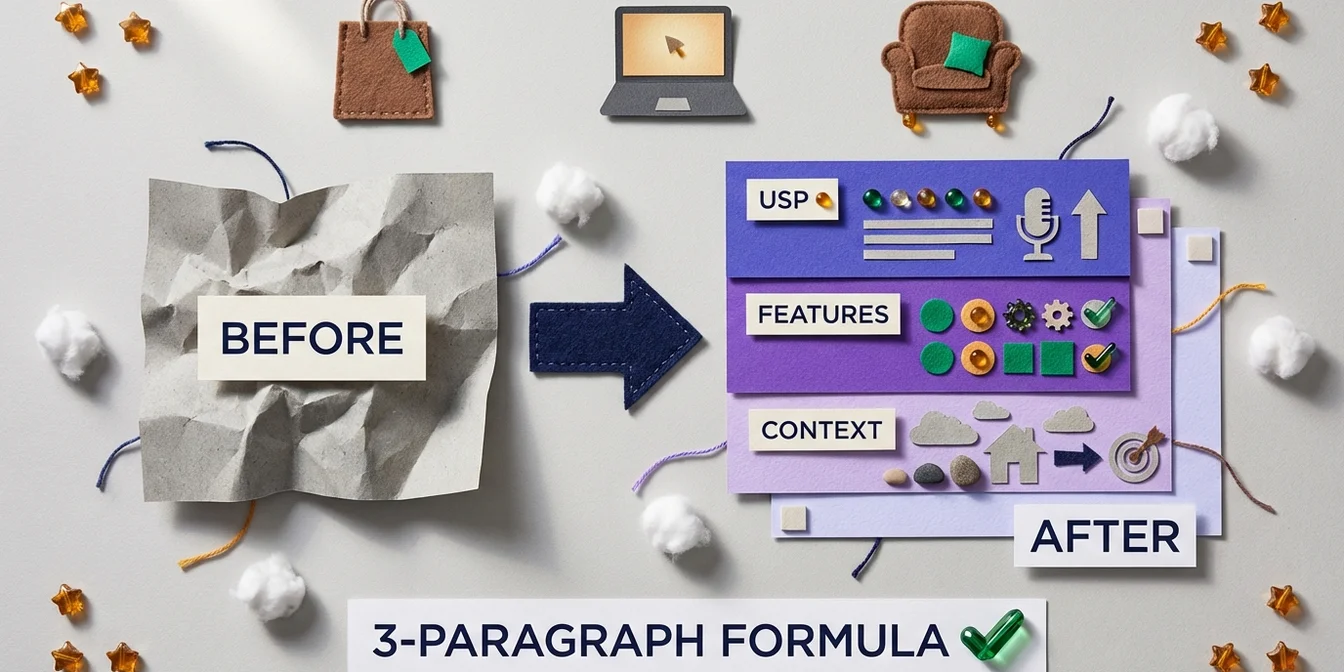
An optimal feed description follows a clear formula: it opens with the product's core USP, then delivers technical details, and closes with usage context. This structure ensures Google finds the most important information first and the user on the Shopping tab immediately understands why this product is the right fit. Unlike traditional store descriptions designed to sell emotionally, a feed description needs to be information-dense and keyword-relevant — without coming across as spammy. The best feed descriptions read naturally while containing strategically placed search terms that the title alone can't cover.
The 3-Paragraph Formula for Feed Descriptions
Structure every description into three logical blocks:
Paragraph 1 — Core USP + Primary Keyword (150–200 characters): What makes this product stand out? State the key benefit and primary keyword in the first one or two sentences. Google weights the beginning of the description more heavily.
Paragraph 2 — Features, Specs, Materials (200–400 characters): Technical details that the title can't fit. Materials, dimensions, technical specs, compatibility. This is where you place long-tail keywords that your target audience actually searches for.
Paragraph 3 — Use Case, Target Audience, Occasion (150–250 characters): Who is this product for? When and where is it used? This paragraph catches contextual queries like "gift for runners" or "home office furniture."
Total length: 500–850 characters. Short enough to stay focused. Long enough to include all relevant keywords.
Keyword Strategy for Descriptions
The description isn't the place for the same keywords as the title. It complements the title with:
- Long-tail variants: "men's running shoes for overpronation" instead of just "running shoes"
- Synonyms: "sneakers," "trainers," "athletic shoes" alongside "running shoes"
- Use-case terms: "marathon," "jogging," "road running"
- Audience keywords: "beginner," "professional," "wide feet"
Avoid keyword stuffing. Google detects unnatural repetition and treats it as spam. A naturally readable description with 3–5 strategically placed keywords outperforms a keyword graveyard.
Before and After: Product Descriptions Compared
Optimized descriptions increase your products' relevance for more search queries — meaning more impressions from the right customers. Here are concrete examples across four industries.
Fashion & Apparel
| Before (generic) | After (optimized) | |
|---|---|---|
| Description | Nice t-shirt available in different colors. Good quality. Order now! | Tommy Hilfiger men's t-shirt in regular fit, made from 100% organic cotton in white. Soft single jersey fabric with classic flag logo on the chest. Ribbed crew neck for shape retention. Perfect as a basic for business casual or weekend outfits. Machine wash at 30°C. |
| Keywords covered | 0 relevant | 8+ (brand, material, fit, color, occasion, care instructions) |
| Characters | 65 | 340 |
Electronics & Tech
| Before (generic) | After (optimized) | |
|---|---|---|
| Description | Great headphones with good sound. Bluetooth. Noise cancelling. | Sony WH-1000XM5 over-ear Bluetooth headphones with industry-leading noise cancelling and 30-hour battery life. Dual processors (V1 + QN1) analyze ambient sound in real-time for optimal noise reduction. Multipoint connection for simultaneous pairing with two devices. 250g lightweight build with soft synthetic leather cushions for all-day comfort. Ideal for commuters, home office, and frequent travelers. Compatible with Google Assistant and Amazon Alexa. |
| Keywords covered | 2 (Bluetooth, noise cancelling) | 12+ (brand, model, battery life, weight, compatibility, use cases) |
| Characters | 61 | 530 |
Furniture & Home
| Before (generic) | After (optimized) | |
|---|---|---|
| Description | Nice desk made of wood. Sturdy and practical. | IKEA BEKANT electric height-adjustable standing desk with memory function, 63x31.5" work surface in real wood oak veneer. Electric height adjustment from 25.5–49" at the push of a button — perfect for switching between sitting and standing in your home office. Integrated cable management tray keeps your workspace clutter-free. Supports up to 154 lbs. 10-year warranty. Ideal as an ergonomic office desk or standing desk for remote work. |
| Keywords covered | 1 (wood) | 10+ (height-adjustable, electric, dimensions, material, home office, ergonomic, standing desk) |
| Characters | 46 | 520 |
Food & Grocery
| Before (generic) | After (optimized) | |
|---|---|---|
| Description | Delicious coffee, ground. Aromatic and full-bodied. | Lavazza Qualità Oro ground coffee, 100% Arabica beans from Central and South America. Medium roast with floral-fruity aroma and honey-like sweetness. Finely ground for drip coffee, French press, and Moka pot. Vacuum-sealed for maximum freshness. 8.8 oz package, perfect as a gift for coffee lovers or for daily enjoyment at home. |
| Keywords covered | 1 (ground) | 9+ (brand, origin, roast, aroma, brew methods, weight, gift) |
| Characters | 49 | 380 |
7 Best Practices for Product Descriptions That Convert
These seven rules separate a description that Google ignores from one that places your product in front of the right search queries. The key is treating each description as a standalone keyword asset — not a copy of the title and not a marketing flyer. Descriptions containing specific long-tail keywords capture queries the title alone could never serve, measurably expanding your total reach without spending a single extra dollar on ads.
1. Primary Keyword in the First 160 Characters
Google weights the beginning of the description more heavily. Place your most important keyword — ideally the same one as in the title — in the first one or two sentences. This strengthens relevance signals.
Bad: "This amazing product will delight you. It offers many benefits and is very popular." Better: "Sony WH-1000XM5 over-ear Bluetooth headphones with noise cancelling and 30-hour battery life."
2. Unique Descriptions Instead of Manufacturer Copy-Paste
Manufacturer descriptions are written for B2B catalogs, not shopping feeds. According to Google Merchant Center best practices, unique, product-specific descriptions outperform standardized text. When 50 other retailers use the exact same manufacturer description, you have zero differentiation.
3. Translate Features into Benefits
Customers don't search for "200-denier nylon." They search for "tear-resistant travel bag." Translate technical features into customer benefits:
| Feature (technical) | Benefit (customer-facing) |
|---|---|
| 200-denier nylon | Tear-resistant material built to last for years |
| IP67 certification | Fully waterproof — safe in rain and by the pool |
| 30h battery life | Lasts an entire work week without charging |
| Memory foam cushions | All-day comfort with zero pressure points |
4. Structure Specifications Effectively
Technical data belongs in the description — structured and readable. Use clear bullet points or short sentences instead of walls of text. Google can interpret structured information more effectively.
5. Match Search Intent, Don't Just Describe
Ask yourself: what would someone type into Google to find this product? Build those terms in naturally. For an office chair, that means terms like "home office," "ergonomic," "back pain," "height-adjustable" — not just "black chair with wheels."
6. Avoid Common Feed Errors in Descriptions
Empty descriptions, HTML tags, promotional language, or duplicate descriptions (identical to the title) are the most common mistakes. They can lead to disapproval of individual products or even your entire feed. The most common Google Shopping feed errors also affect product descriptions — especially missing required attributes and prohibited content.
7. Properly Label AI-Generated Descriptions
Since 2025, all AI-generated product descriptions must use the structured_description attribute and be labeled with digital_source_type: "trained_algorithmic_media". This applies when you use AI tools for automated description generation. Correct labeling protects you from Merchant Center disapprovals.
Optimizing Descriptions with AI: What Works
AI tools can generate product descriptions in seconds and optimize them for shopping feed requirements. But not every AI-generated description is automatically good. The difference lies in the prompt and quality control.
Prompt Engineering for Product Descriptions
A good prompt for feed descriptions includes:
- Product data: Title, brand, category, attributes from the feed
- Target audience: Who buys this product?
- Keyword targets: Primary + secondary keywords
- Format requirements: 3-paragraph formula, character limit, no prohibited content
- Negative instructions: No promotional text, no prices, no links
Example prompt:
Create a Google Shopping feed description (500-800 characters) for:
- Product: [title from feed]
- Brand: [brand]
- Category: [product category]
- Target audience: [e.g., hobby runners, age 25-45]
- Keywords: [primary + 3 secondary keywords]

Structure:
1. Sentence: Product + core USP + primary keyword
2. Paragraph: Technical details, material, specifications
3. Paragraph: Use case context, target audience, occasion

Prohibited: Prices, promotional text, links, HTML, ALL CAPS.
Quality Control: What to Watch For
AI-generated descriptions always need review:
- Fact check: Are the specifications accurate? AI sometimes hallucinates dimensions or features.
- Keyword check: Are the target keywords naturally integrated?
- Duplicate check: Are the descriptions truly unique? With large catalogs, AI tools tend toward repetitive phrasing.
- Policy check: No prohibited content like prices, links, or promotional language?
structured_descriptionset? Required since 2025 for all AI-generated text.
Checklist: Optimize Your Product Description
Run through this checklist for every product description:
- Primary keyword in the first 160 characters?
- Unique description — no manufacturer copy-paste?
- 500–850 characters total length (not too short, not too long)?
- 3-paragraph formula applied (USP → Features → Context)?
- Long-tail keywords included that the title doesn't cover?
- Synonyms for the main product integrated?
- Features translated into benefits (not just specs, but value)?
- No prohibited content (prices, links, HTML, promotional text)?
- Not identical to the title — description complements, doesn't duplicate?
-
structured_descriptionset if AI-generated? - Specifications included (material, dimensions, weight, compatibility)?
- Target audience and use case described?
How FeedOptimizer.AI Helps You Scale
Manually optimizing thousands of product descriptions is unrealistic. Developing the right keyword strategy for every item, writing unique text, and applying the 3-paragraph formula doesn't scale when you have 500, 2,000, or 10,000 products in your feed.
FeedOptimizer.AI optimizes descriptions automatically with AI and:
- Analyzes each product individually — category, attributes, and search intent feed into the description
- Generates unique descriptions instead of copy-paste templates — every product gets an individual text
- Places relevant keywords naturally — primary and long-tail, based on real search behavior
- Applies the 3-paragraph formula automatically — USP, features, use case context
- Handles
structured_descriptioncorrectly — automatic AI labeling per Google's guidelines - Delivers descriptions as a supplemental feed — your original feed stays untouched
What This Means in Practice
Imagine you run an electronics store with 3,000 products. Your current descriptions are manufacturer text — identical across all 50 retailers selling the same product.
| Manufacturer description | FeedOptimizer.AI description |
|---|---|
| Wireless headphones. Bluetooth 5.0. ANC. Black. | Sony WH-1000XM5 over-ear Bluetooth headphones with industry-leading noise cancelling. Dual processors for real-time noise reduction. 30h battery, multipoint for two devices simultaneously. 250g lightweight with memory foam cushions for all-day comfort. Perfect for commuters, home office, and travel. |
Manually optimizing 3,000 descriptions like this would take weeks. With FeedOptimizer.AI, your optimized descriptions are ready as a supplemental feed in minutes — and you can always revert to the original.
Frequently Asked Questions
How long should a Google Shopping product description be?
Google allows up to 5,000 characters, but the optimal length is between 500 and 850 characters. Descriptions under 200 characters don't give Google enough context for accurate query matching. Overly long descriptions dilute keyword density. Focus on the 3-paragraph formula: USP, features, and use case context — that naturally produces the right length.
Are product descriptions displayed in Google Shopping ads?
No, descriptions are not visible in paid Shopping Ads themselves. They do appear on the Google Shopping tab and in free listings. What matters most: Google indexes the entire description for query matching. A good description determines which search queries trigger your product — even if the user never directly reads the text.
Can I use the same description for my store and my feed?
Yes, but it's not recommended. Store descriptions are optimized for the end customer — emotional, sales-oriented, often with HTML formatting. Feed descriptions need information-dense, keyword-relevant text without HTML, links, or promotions. According to Google Merchant Center best practices, feeds with dedicated, feed-optimized descriptions perform better.
How often should I update my product descriptions?
At minimum, quarterly. New search trends, seasonal keywords, and Google's evolving matching algorithms make regular updates worthwhile. Analyze the Search Terms Report in Google Ads: if converting queries appear whose keywords aren't in your descriptions, an update is overdue.
What happens if my product description violates Google's guidelines?
Best case: the individual product gets disapproved and doesn't appear in Shopping Ads. Worst case — with systematic violations like promotional text in all descriptions — Google can restrict or suspend your entire Merchant Center account. Common reasons for disapprovals include HTML tags, links, price claims, and misleading content in descriptions.
Conclusion: Descriptions Are Your Hidden Performance Lever
The product description is the most underrated lever in Google Shopping. While not visible in ads, it significantly determines which search queries trigger your products.
The 5 key takeaways:
- Apply the 3-paragraph formula — USP, features, use case context. This gives Google all the signals for precise matching.
- Add long-tail keywords — descriptions cover what the title can't fit.
- Write unique text — manufacturer copy-paste provides zero differentiation.
- 500–850 characters is the sweet spot — enough context without diluting keyword density.
- Use AI, but verify — automated descriptions scale, but require quality control.
The easiest way to start: take your top 20 revenue-generating products and optimize their descriptions with the 3-paragraph formula. Measure impression share before and after. You'll see the difference.